List

Adobe Documentation

Core Components Guide: List Component | Adobe Experience Manager

Core Components Example: List

Core Components Inventory Mapping Behaviour

  • Lists pages
  • Lists of pdfs/images from DAM
  • List generated from tags, folder or manually selected items

List of pages with no linking

  • Accordion
  • Breadcrumb
  • Button
  • Carousel
  • Container
  • Image
  • List
  • Media Embed
  • Teaser
  • Text
  • Card-Generated
  • Separator
  • Header
  • Title
  • Card Authored

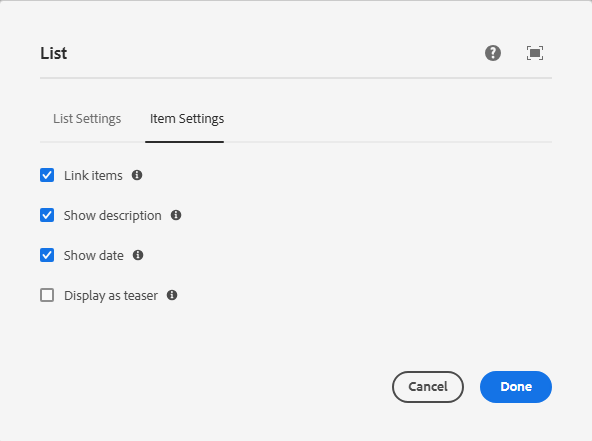
List of pages with links, date and descrption selected

To enable a list item to link to its destination you need to enable it in the Item Settings tab in the dialog
  • Accordion 2026-07-21 Displays content in expandable and collapsible sections, allowing authors to organize large amounts of information while reducing page clutter.
  • Breadcrumb 2026-05-27
  • Button 2026-08-20 Creates a prominent call-to-action that links users to internal pages, external websites, downloads, or other destinations.
  • Carousel
  • Container
  • Image 2026-07-15 Use the Image component to display responsive images with support for accessibility, Dynamic Media, and asset management features.
  • List 2026-06-04
  • Media Embed 2026-07-22 Use the Media Embed component to incorporate external media content such as videos and social media posts into your pages.
  • Teaser
  • Text 2026-07-22 Use the Text component to create and format page content using the rich text editor, including headings, lists, links, and styled text.
  • Card-Generated Use the Generated Card component to display a collection of cards that are automatically created from authored content, content fragments, or search results. Cards can present information such as images, titles, descriptions, and links in a consistent, visually engaging layout that helps visitors discover related content.
  • Separator 2026-08-04
  • Header
  • Title
  • Card Authored

Listing of DAM assets from bclc-owned folder

Here we have links to DAM assets from the bclc-owned folder

Dates and descriptions have been populated and selected to display

Clicking on the link will download it (unless user's browser settings are different)